Context-Driven Development
Overview
Hello! In this post I am going to share my experience with an AI development workflow that I tried out recently for development of an MVP. The workflow is simple but moves away from REPL instructions and into a brief-oriented development flow, so agent context can be derived quickly, hopefully arriving at the correct feature implementation sooner. It also makes later agent sessions more effective.
If you’re looking to try this out, I created a repo that should hopefully make it easy to copy into your project. https://github.com/brandondvs/context-driven-development
The rest of this post will explain how I used it to build an MVP and what I learned using this development workflow.
The MVP
The application is from an idea I had building shareable custom social and realtime map routes for events. The maps are built using a custom website, which I call the Studio, where you can place points of interest, design different routes across the road network, and place zones. Then these maps can be “experienced” via a mobile application that displays your position on the map along with everyone else that is part of the event. The mobile application is the central view of the map for everyone attending the event that was designed in the Studio.
Demo hero generated by Claude Code using SVG and JS.
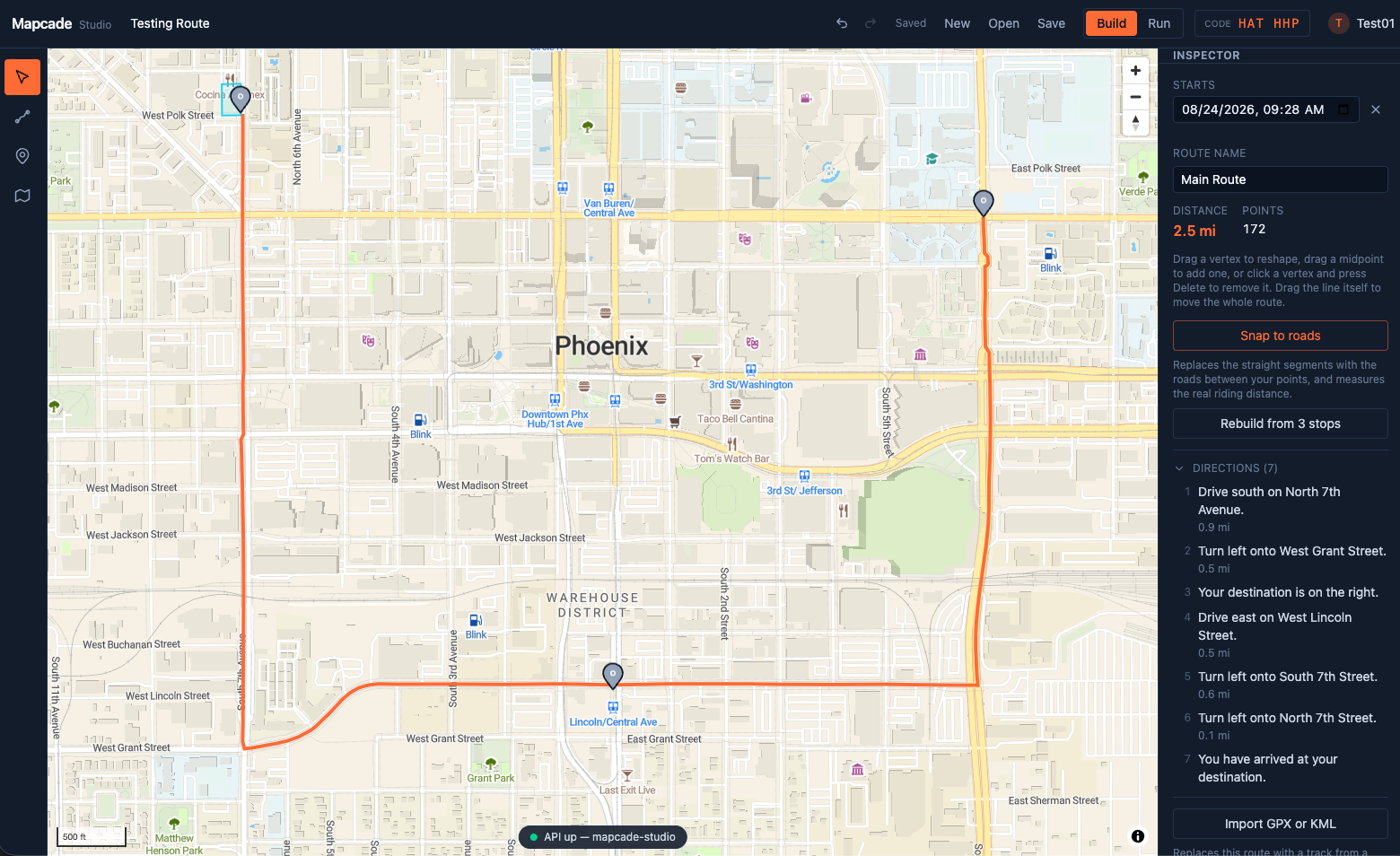 Designing a route in the Studio.
Attendees tracking each other live during an event.
The Technology Architecture
The application architecture includes a few different components all running locally.
- The Studio is built as a web application for event creators to design the event map routes.
- A mobile application for iOS that allows attendees of the event to navigate the created map route from the Studio.
- Backend server that implements a REST API for interacting with the database, and a websocket for the event to use to keep all attendees in sync with each other.
Tools, Frameworks, Languages
Tools, frameworks, languages were picked to keep things simple and are also what I am most familiar with.
Web App (Studio)
- TypeScript, React
Backend
- Golang
- SQLite for database persistence
- Routing server for road networks
Mobile
- Swift, SwiftUI
Local Dev
- Docker, Docker Compose
Development Environment
My development environment at this point in time is composed of the following tools.
- macOS (26.5.2)
- Zed code editor
- Claude Desktop
- Claude Code (Opus 5 (1M context) · Claude Max)
- Ghostty
AI Workflow
The AI workflow that I used is pretty simple.
- Create a
docs/folder in the given repo that contains a pointer file that allows the agent to get up to speed quickly with the correct context. This should be referenced from theCLAUDE.mdas well. I useddocs/decisions.mdand then doubly linked this by referencing theCLAUDE.mdindecisions.mdand thendecisions.mdinCLAUDE.md. The goal is to build a trail of information for the agent to get a quick overview of the important aspects of the project. - The
decisions.mdshould contain a list of decisions that you have made for the project in its current state. This can include technology stacks, UX trade-offs, what are the goals of different milestones, etc. - Then create a
docs/product-concept.mdthat covers the vision of the product. I found that this is useful to ensure that the AI is always working with a snapshot of the current vision instead of replaying it in future sessions or losing direction as the context window fills. It also helps with keeping the context small as the project repo grows in size too. - After the foundational components for guiding the agent to discovery have been laid out, I started working on the feature documents. These documents explain the details of the intended functionality for the agent to implement, how it should break up the work to ensure correct implementation, and then the success criteria for each.
- After the feature brief has been completed, it gets added to the
decisions.mdunder a section called “Next in development (active briefs)”. Then point a coding agent at it and let it work on things. - The agent has completed the work and next it is to compress the brief into a few points describing the implementation and create information that tells future agents where to find the implementation of the work. Brief implementations are also stored within the git commit itself so that content can be referenced later.
- Depending on the next brief, I would run
/clearto get a fresh session with updated re-read context (e.g. loading any updates toCLAUDE.md).
With that workflow the agent is able to leave bits of information around that help guide and constrain it. For example, within one of the implemented briefs, the compressed result would include this at the bottom of the file:
**Start with `docs/decisions.md` for context.** Vision: `docs/product-concept.md`. Conventions: `CLAUDE.md`.
decisions.md — the header looks like this.
*Fast-context doc — **read this first.** What's built, what's next, and the binding decisions. The **code** is the source of truth for mechanics; full original build briefs live in git history. Vision/why: `docs/product-concept.md`. Conventions & orientation: `CLAUDE.md`.*

*Updated 2026-08-19.*

*Maintenance convention: when an active brief's work merges, **compress on merge** — fold its decisions into this doc (a line or two each) and reduce the brief to a short "✅ Shipped" stub; the code and git history hold the mechanics.*
Given that this workflow is local and stores everything in the repo, it makes it really easy to ensure that other coding agents have the latest context at a point in time and other developers can easily get things going with their agents.
The repo ends up looking like this layout.
your-project/
├── AGENTS.md                   # conventions: how we work here (small, stable)
├── CLAUDE.md                   # -> AGENTS.md (symlink, or a two-line pointer)
├── docs/
│   ├── decisions.md            # THE state doc: read this first
│   ├── product-concept.md      # the why: problem, stances, what you won't build
│   └── brief.md                # active work
└── src/ ...
Stats
Since this is an MVP I wanted to target speed to useful product. The results were interesting.
| Metric | Value |
|---|---|
| Active development time | ~19 hours |
| Working days | 6 (spread over 12 calendar days) |
| Commits | 79 |
| Lines added / deleted | 42,940 / 5,061 (net +37,879) |
| Files tracked | 260 |
| Average | ~4.1 commits and ~2,000 net lines per hour |
Lines added includes docs, generated files, and deleted rewrites.
| Language | Lines | Share of code | Of which tests |
|---|---|---|---|
| Go (backend) | 11,263 | 36.2% | 58% |
| Swift (iOS attendee app) | 9,704 | 31.2% | 44% |
| TypeScript (Studio web) | 9,453 | 30.4% | 35% |
| Python (dev tooling) | 720 | 2.3% | — |
Conclusion
All in all this was a fun exercise. Here are a few main points that I took away from this project.
Customer & Product Development AI coding is a tool to solve a customer’s problem. That customer could just be you. But you still need to be able to think from a usability perspective and solve the right problem. No amount of coding agent is going to work if you’re solving the wrong problem.
Write the briefs like a contract It is better to tell the agent what not to do just as much as to describe what it should do. If the constraint is not given, the agent would go off and over-implement a feature or start fixing bugs that it finds. It was best to have it limited in scope, really guiding it along with what you want implemented.
Stop Points Within the briefs, explain what a successful stop point might look like with the feature. For example: working on the mobile app and adding realtime location tracking involved explaining how to implement the backend, while also ensuring that the mobile map view showed the dot of the location by taking a screenshot. Another was that the build was passing along with the tests.
Workflow around what the model does
If you find that the model is verbose in output, make a note in the CLAUDE.md file to get only shortened responses of an overview of the feature or fix, along with any concerns that were found that could become a potential issue in the future.
Managing context more than writing instructions A lot of the time I was mostly writing text that controlled what the agent was working on and how to find the information and nothing more. Obviously, it would discover things as it loaded the different code paths, brief files, and git history into context. But this still resulted in scoping the context down for the feature that was being implemented.